Introduction
Building a website has never been more accessible, thanks to advancements in technology and a plethora of online resources. In this guide, we’ll walk you through the essential steps to create a professional-looking website from scratch, perfect for beginners in 2026. Whether you’re starting a blog, an online store, or a portfolio, this comprehensive tutorial will provide you with all the necessary tools and knowledge.
Choosing a Domain Name
Understanding Domain Names
A domain name serves as the address for your website on the internet. It is what users will type into their browser to access your site, such as www.yourwebsite.com. Choosing the right domain name is crucial, as it contributes to your brand identity and affects search engine optimization (SEO).
The ideal domain name should be memorable, easy to spell, and relevant to your content or business. Additionally, consider the extension; while .com is the most common, alternatives like .net, .org, and newer extensions like .tech or . A store can also be suitable based on your niche.
Tips for Selecting the Perfect Name
- Keep it Short: Aim for a concise name that’s easy to remember.
- Avoid Numbers and Hyphens: These can confuse users when sharing your domain verbally.
- Use Keywords: Incorporate relevant keywords that describe your website’s purpose.
Brainstorm a list of potential names and get feedback from friends or colleagues to gauge their appeal. This collaborative approach can help refine your choices and lead to a strong domain selection.
Checking Domain Availability
Once you’ve settled on a few domain name options, it’s time to check their availability. Various online tools and registrars, such as GoDaddy, Namecheap, or Google Domains, allow you to easily see if your desired domain is taken. If your first choice is unavailable, consider variations or alternative extensions.
Securing your domain promptly is essential, as domains can be snapped up quickly. Once you find an available name, register it through a reputable registrar to ensure you own it and prevent others from acquiring it.
Getting Web Hosting
What is Web Hosting?
Web hosting is a service that allows you to store your website’s files on a server, making them accessible on the internet. Without hosting, your website cannot be seen by users worldwide. Think of web hosting as renting space for your website on the internet.
Different hosting providers offer varying levels of service, speed, and support, so it’s essential to choose a provider that meets your needs, especially as a beginner.
Types of Web Hosting
- Shared Hosting: Cost-effective and ideal for small sites with low traffic, but resources are shared among multiple users.
- VPS Hosting: Provides more resources and control than shared hosting, making it suitable for growing websites.
- Dedicated Hosting: Offers an entire server for your site, providing maximum performance but at a higher cost.
- Managed WordPress Hosting: Specifically optimized for WordPress sites, with additional features and support tailored to WordPress users.
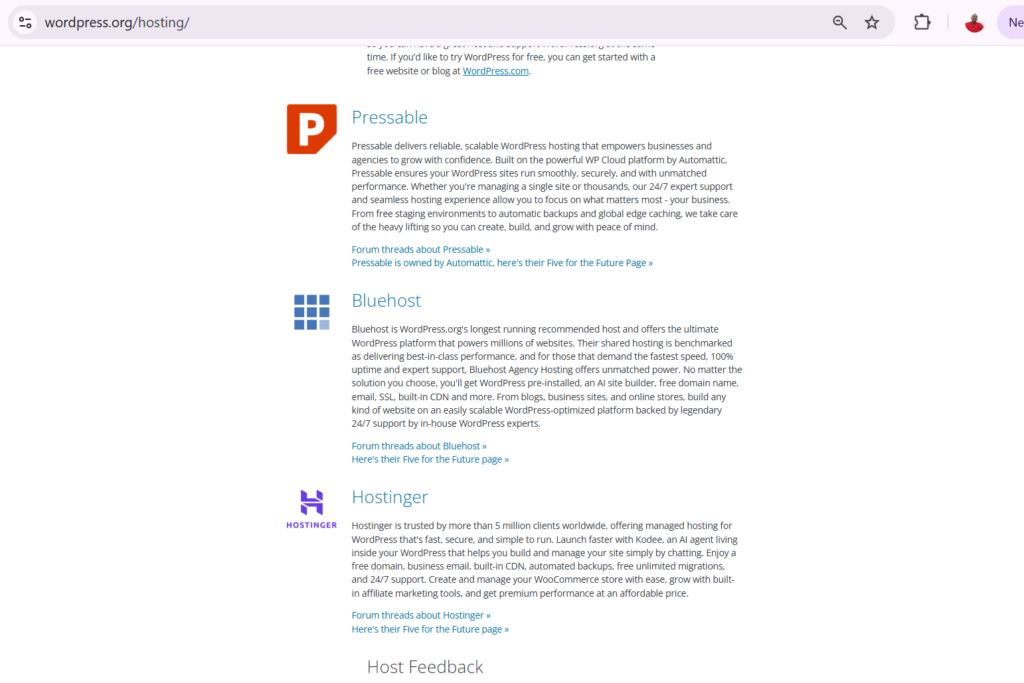
You can purchase hosting from these recommended hosting platforms:
Reasons for the above hosting companies are that WordPress selected them as the best hosting partners
Choosing the Right Web Host
When selecting a web host, consider factors such as uptime guarantees, customer support, and scalability. Look for reviews and ratings from current users to gauge their experiences. Popular hosting providers like Bluehost, SiteGround, and HostGator are often recommended for beginners due to their user-friendly interfaces and reliable service.
Additionally, check for features such as free SSL certificates, automated backups, and one-click installations for content management systems like WordPress, as these can significantly enhance your website management experience.
Installing WordPress
Why Use WordPress?
WordPress is the most popular content management system (CMS) globally, powering over 40% of websites on the internet. Its user-friendly interface, extensive customization options, and robust community support make it an excellent choice for beginners and experienced developers alike.
With thousands of themes and plugins available, WordPress allows you to create virtually any type of website, from blogs and portfolios to e-commerce platforms.
Step-by-Step Installation Guide
Many web hosting providers offer one-click WordPress installation, simplifying the setup process. Generally, the steps include:
- Log in to your hosting account.
- Locate the WordPress installer under a section typically labeled Website or Softaculous Apps Installer.
- Follow the prompts to select your domain and fill in the necessary information, such as site title and admin credentials.
- Complete the installation and access your new WordPress site through the provided link.
Setting Up Your WordPress Dashboard
Upon installation, log into your WordPress dashboard at www.yourwebsite.com/wp-admin. The dashboard is your command center for managing your website. Familiarize yourself with key sections like Posts, Pages, Media, and Appearance.
Here, you can create and edit content, upload images, and customize your site’s design. Take the time to explore plugins and settings available to enhance functionality and performance.
Designing Your Website
Choosing a Theme
Your website’s theme dictates its overall look and feel. WordPress offers a vast selection of free and premium themes. When selecting a theme, consider your website’s purpose and your target audience. A clean, responsive design is essential for user experience, particularly on mobile devices.
Look for themes that offer customization options to tailor the look according to your brand’s identity. You can also check theme reviews and ratings to ensure quality and support.
Customizing Your Site’s Appearance
Once you have chosen a theme, navigate to the Appearance section in your dashboard to customize it. Here, you can change colors, fonts, and layouts to align with your brand’s aesthetic. Adding your logo, setting the header image, and adjusting the menu structure are also essential steps in this process.
Don’t forget to make your site user-friendly. Ensure that navigation is intuitive and that important information is easily accessible. This will help visitors stay engaged and reduce bounce rates.
Essential Plugins for Beginners
Plugins are tools that extend the functionality of your WordPress site. For beginners, several key plugins can enhance performance, security, and SEO:
- Yoast SEO: Helps optimize your content for search engines and improve visibility.
- Wordfence Security: Provides robust security measures to protect your website from threats.
- WooCommerce: Ideal for those looking to create an online store.
- Contact Form 7: An easy way to add contact forms to your site.
Install only those plugins that you need to avoid cluttering your website and slowing down its performance.
Publishing Your First Pages
Creating Your First Page
Creating pages in WordPress is straightforward. Go to the Pages section and click Add New. Here you can create essential pages such as Home, About, Contact, and Services. Use the block editor to add text, images, and other media to your pages.
Be mindful of your page structure; use headings and subheadings to break up content, making it easier for readers to skim and find information. This not only enhances user experience but also aids in SEO.
Writing Engaging Content
Content is king when it comes to websites. Ensure your content is engaging, informative, and aligns with your audience’s needs and interests. Use a conversational tone and avoid jargon to keep readers engaged. Incorporate storytelling elements and personal anecdotes to make your content relatable.
Regularly updating your content can also improve SEO and provide returning visitors with fresh material. Consider developing a content calendar to plan your posts and maintain consistency.
Adding Images and Media
Visuals play a critical role in enhancing user engagement and breaking up text-heavy pages. Use high-quality images and videos that are relevant to your content. Websites like Unsplash and Pexels offer free images that you can use without copyright issues.
Optimize your images by compressing them to reduce loading times. Additionally, always add alt text to images for accessibility and better SEO. Descriptive alt text helps search engines understand the context of your images, contributing to overall site ranking.
WATCH FULL VIDEO BELOW:
Conclusion
Building a website can be a rewarding endeavor, whether you’re doing it for personal reasons or as a business venture. By carefully selecting a domain name, choosing the right hosting service, installing WordPress, and designing your site effectively, you can create a professional online presence.
Remember that the key to a successful website lies in quality content, user-friendly design, and ongoing optimization. Stay updated with the latest trends and best practices in web development to continually improve your site.
Additional Resources
For further learning, consider exploring my YouTube channel, where you can find detailed tutorials on web design, SEO, and content creation. Additionally, communities like WordPress.org offer forums and resources that can be invaluable as you navigate your website journey.
Recommended Resources:
🌐 Web Hosting I Recommend:
🎨 Website Design Tools:
Elementor (Best WordPress Website Builder)
📈 SEO Tools:
Rank Math (Best SEO Plugin)
FAQs
1. How much does it cost to build a website?
The cost can vary significantly based on hosting, domain registration, and whether you choose premium themes or plugins. On average, expect to spend between $100 to $500 annually.
2. Do I need coding skills to build a website?
No, many platforms like WordPress allow you to build and customize websites without any coding skills. However, knowing some basic HTML and CSS can be beneficial.
3. How long does it take to build a website?
The time it takes can vary widely depending on your familiarity with the tools and your site’s complexity. A simple site can be set up in a few hours, while more complex sites may take weeks.
4. Can I change my domain name later?
Yes, but changing your domain can impact SEO and redirect traffic, so it’s best to choose wisely from the start.
5. What is the best platform for beginners?
WordPress is widely regarded as the best platform for beginners due to its ease of use, extensive resources, and customization options.